New Tech Buzz is a blog for Tech Geeks and Bloggers where we share fresh and updated information related to Internet, Social Media, Gadgets, Blogging, How-To Guides, Internet Marketing, SEO and much more related to Technology.

Showing posts with label Google. Show all posts

Wednesday, March 19, 2014

Nowadays many schools and colleges are Providing internet access in their campus, but with a restriction.They are Blocking many popular sites like Facebook, twitter, etc.So in this article I would like to discuss the Top 10 ways to access Blocked Websites.

1.Using IP address instead of Web Site URL

Most of the software which block the sites in our PC uses Website address/URL only like i.e. www.Facebook.com, www.twitter.com, etc.So can access those sites with their IP address instead of URL.Every website has its unique IP address same as the Computer and mobile devices.To get IP address of a website Simply Run Command Prompt and type:-
       Type Command: ping domain.com
Type this command in Command Prompt and replace “doamin.com” with the site URL of which you want to get IP address.
  • For Ex: ping google.com
  • IP address of google –>74.125.236.142/
You will see one IP address many times its your web site Address just note down it and run it on your browser.

2.Using Manual Proxy in Browser

Many Popular browsers support manual Proxy IP address.So using those proxy you can surf anonymously and access all blocked web sites.There are huge list of Free Proxy available on Internet so don’t need to buy.You can get it from Here.

How to set manual Proxy in Mozilla Firefox:

Run Firefox browser and go to Option and then click on Advance.Then go to Network Tab and Click Connection settings button.A new box will appear click on Manual Proxy Settings.Now enter Proxy address and Port in box and click on save settings.Now you are surfing internet using Proxy. Many proxy will not work on you Computer so don’t worry just keep changing the Proxy address which are not working with the new address.

3.Redirecting Blocked web sites with URL Shorten Service

Everyone knows URL shortner sites are used to convert Long URL to Short.But URL shortner site allow you to bypass the security settings.You can use following URL shortner sites Tiny URL, MooURL.

4.Using VPN software to unblock Websites

Using VPN is the best way to access blocked ways.VPN software allows you to browse anonymously, just download it and install on you PC.This Software is available in both paid and free version.Here i have listed some best VPN software.
1.ProxyXPN VPN
2.Hotspot Shield VPN
3.Tunnel Bear VPN
Must Check: HOW TO OPEN MOBILE WEBSITES ON PC BROWSERS CHROME AND FIREFOX

5.Surfing using TOR browser

You can use TOR browser to access the blocked websites, but you can’t access social networking sites Like Facebook, Twitter, etc.Because these sites needs to store cookies in browser.So you can’t access the sites which stores Cookies.Using TOR is the best way to hide you online identity.Just download TOR browser from the below link:- Download from here

6.Using Decimal Code

As in the first method i showed instead of using URL, you can access Site using there IP address.But what if there IP address are also blocked, so here works decimal codes.Decimal codes are nothing rather than conversion of IP address in decimal.You can access Blocked web site with their Decimal number and to get Decimal number you need IP address of the Web site URL (Showed in Method 1). Just note down IP address and covert it using this tool.

7.Reading web page in E-mail box

Email the web is a free service which sends web sites straight away to you mail box.To get web page via mail you have to register on Email the web site and enter the web site URL and enter e-mail address.And you are done.

8.Using Hola extension

Hola is a Browser extension which allows you to browse internet anonymously.Hola Browser extension is available for all major Browser.You can download extension for your browser from there official website.

9.Using Translation service

Major Search engines like Google and Bing provide you a translation service to covert web page from one language to another.To access blocked web site from this servce, just enter the Web site URL of blocked which you wnat access and convert it into any other languages.Using this you cna convert whole web page into other language and access its content.

10.Using Wayback Machine

Wayback machine is an online service which keeps a copy of all most all web sites from the day they were started.Just enter Web site URL and click on the latest copy of wayback machine.Using this service you can access Blocked website.
I hope guys you enjoyed the article.If have any query Feel Free to ask in Comments.
Continue reading

In our daily internet usage we browse so many websites for different purposes and most of them in desktop versions. Its fine there is no problem with those websites but few of the websites are still in mobile version with no desktop version. They never opened in normal PC browsers by default and in some cases we also need to open desktop versions of websites in mobile version. So what to do?
Here We shared two methods to open mobile websites in pc browsers and one other method to open them in PC.

1. User Agent Switcher:

User agent switcher is an extension which is available on both chrome and Firefox browsers. It helps you to change the user agent of the browser with easy options. Here is the procedure on how to use it on both chrome and Firefox browsers.

For Chrome Users:

  • First you need to download user agent switcher extension from chrome store by searching for user agent switcher, alternatively you can download it here. Download User Agent Switcher
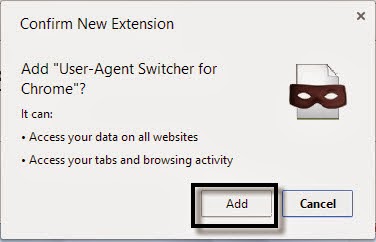
  • Now install it on your browser by clicking on add button, after installation it will appear beside on browser address bar.
chrome user agent switcher
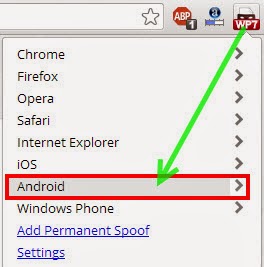
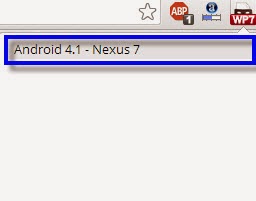
  • Click on User agent Switcher icon and select any one of the mobile user agent . Here i choose Android and again choose Android 4.1 – Nexus 7 model.
android user agentandroid 4.1
Now try to open any website and it will be opened in mobile website mode, you can also open any mobile website without any problem.

For Firefox Users:

Open Firefox browser and go to Mozilla add-ons page and search for user agent switcher addon, alternatively you can download it from here. Download User Agent Switcher
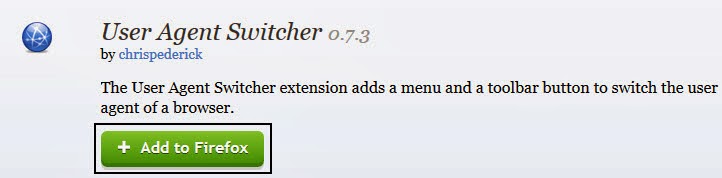
Click on “add to firefox” then it prompts one dialogue box named with software installation.Click on install now button to install it on your browser.
user agent switcher for firefox
software installation on firefox
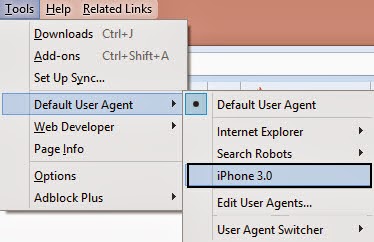
  • Once installation completed you need to restart browser and after that you will get this addon on Tools menu named as “Default user agent switcher”.
  • Click on that and select Iphone 3.0 to change the user agent of the browser. Now you can open any website in mobile mode and also open mobile websites in pc.
iphone user agent in firefox
If you want more user agents then go to this addon options and download the whole list of user agents.

2. Opera mini Simulator:

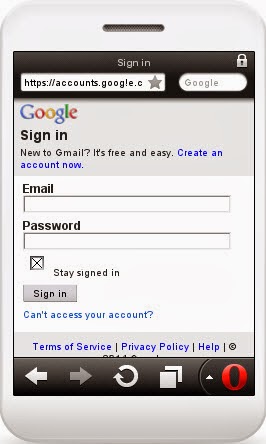
You can Use Opera mini simulator to open mobile websites in pc browser like chrome and Firefox. Opera mobile browser developers make a simulator which is useful to users for the purpose of testing websites. Here we use the same simulator to open mobile websites in our pc browser.
  • First open any one of the browser available to you and type this website address in your browser address bar. http://www.opera.com/developer/opera-mini-simulator
  • Now it asks your permission to run java objects in your browser. Click on allow button and run opera mini simulator.
    opera mini simulator
  • Now open any mobile website in that mobile simulator and it will be open with in seconds based on your internet speed.
That’s it. In this way you can open any mobile website or browse desktop versions in mobile mode. This will be helpful to browse some blocked websites also.
Continue reading

Friday, March 7, 2014

Everyone surf the internet for several purpose but most of us surf the internet to find some information or article. While we get the information or article as our wish and if we think that the article is helpful then we want to save it for offline viewing in future. Some people consider copy and paste method to store the article. But why you follow the copy paste method while you can save a webpage as PDF file. Yes! There is a simple way you could use to save webpage as PDF directly through your web browser for offline viewing and printing without installing any software and in this article we are explained you how to do that.
save%252520webpage%252520as%252520pdf_thumb%25255B6%25255D

How to Save Webpage as PDF?

There are different ways to for Google Chrome and Mozilla Firefox. So follow the steps as given below.

MUST CHECK : How to Download Google Books in PDF Format for free

Save Webpage as PDF in Google Chrome

If you are using Google Chrome as your default web browser then you don’t need to install any software or any extension, because Chrome browser act as a PDF writer itself. So, if you don’t have installed it then install it first and then follow given the steps.
  • Open Chrome browser and go to the webpage which you want to save as PDF.
  • After opening the webpage, press Ctrl + P (if you are on a Mac then press cmd + P) and it will open print dialog box in your chrome browser.
  • Now click on Change button beside of destination from the left pane.
click%252520on%252520change_thumb%25255B142%25255D
  • Once you click on change button then a new popup will appear and select Save as PDF option under Local Destination.
save%252520as%252520pdf_thumb%25255B2%25255D
  • Now click Save and your webpage will be save and stored in your PC as a PDF file. Now you can use it for future reference.
save_thumb%25255B2%25255D
  • In stored PDF contain Date and webpage Title at header and contain Webpage URL at the Footer, if you don’t want to include it then just uncheck Headers and Footers option.
check%252520or%252520uncheck%252520the%252520option_thumb%25255B4%25255D
  • Also you can check or uncheck the option Background colors and images to get colors and image of that webpage.

Save Webpage as PDF in Mozilla Firefox

Mozilla Firefox is one of the best web browsers, but in case of Mozilla Firefox you need to install an Add-on to converting webpage or save a webpage as a PDF file.
  • First install the Add-on called Save as PDF in your Firefox.
  • Open any webpage as your wish and click on Save as PDF’s add-on icon from the top of your browser.
saveas%252520pdf%252520icon_thumb%25255B2%25255D
  • After few seconds it will start the download PDF file. Now your webpage will stored as PDF file in your computer.

Use online service

Also you can convert a webpage into PDF file through online. There are lots of website are available that allows you to save a webpage as PDF by giving the URL of the webpage on that website. Some websites are Web2pdfconverter, Htmlpdf, pdfcrowd etc.

Conclusion

With the help of the above method you will be able to convert any webpage into PDF which will help you to view an article or some interesting information even you are offline. So, try it and give your feedback here.
Hope you like this article, if you like it then don’t forget to share it.
Continue reading

Google always try to serve better service than other and Google books is also one of them. Google books is one of the best sources to find eBooks on the internet. You can find millions of eBooks, magazine, and documents of all type of genres or categories like science, novel, general, health, internet and many more and you can read them online for free. There is no limitation on reading eBooks and you can easily access it either on your pc, android device or any mobile with internet connection. Also you can share the books with your friends but if you like a books and want it badly for offline reading then the problem will occur, because those cannot be downloaded. But don’t get disappointed because we still have a way to download Google books and here we are discussed how to download Google books in PDF format for free. So keep reading….
Download-google-books_thumb%25255B4%25255D
How to save any Webpage as pdf

Steps to Download Google Books in PDF format

As a user of Google books you must be aware of the fact that the Google books cannot be downloaded or saved and you always need to have internet connection to access them, but you can download Google books in pdf format in your pc by using Google books downloader.
Google books downloader is a free, open-source utility handy tool that let you to download Google books directly in your computer as PDF file and you can access them offline.
So, now follow the below steps to Download books from Google using Google books downloader
  • First of all you need to download Google books downloader which is too small in size and absolutely free.
  • After downloading this tool, install it in your computer and Run this application, to run this application you may have Microsoft .NET Framework 3.5  in your system.
  • Now go to Google Book page and find the books you wish to download.
  • Copy the URL from your browser when book is opened which you wish to download in PDF format.
  • Now enter the copied URL in Google book downloader’s Book URL section and click on Download button. Before start downloading make sure output format is PDF. Also you can also change the output folder where the eBooks will be saved.
Google-book-downloader

  • The download takes quite some time to complete so you may have to wait a little before takes the benefit of downloaded eBooks. Once the download has completed you can access the Google book in offline in your computer and you can access it anytime anywhere.
MUST CHECK :  Best 3 Website to Learn C/C++ Programming Language Online

Conclusion

That’s the process to download Google books as pdf by using Google book downloader. Using this process you cannot download all eBooks from Google book, only free eBooks will be available for download.
Hope you enjoyed this article. After using this service share your thoughts with us. If you faced any problem then leave a comment for us and we will get back to you soon with solution.
Continue reading

If you are an engineering or computer student then programing language must be include in your syllabus and you can learn C and C++ easily. But if you are not an engineering or computer student and want to learn computer programming such as C and C++ then you can learn programming online. There are many sites are available that have tutorial to learn C language, but it’s difficult to find best of them. So keeping in this mind we are listed here best 5 site to learn C and C++ programming language online.
Learn-c-programming_thumb%25255B8%25255D

Why need to learn C language?

With the growth of information technology, computer programming is becoming an essential skill for a lot of professions and here is some strong reasons why you should lean C.
  • C is one of the most widely used programming language in the IT industry.
  • If you want to learn high level programing language like C++, Java, Perl, Python and C# then you must need to learn.
  • C is the primary language that used in developing operating system.
  • Thus the future of computer programming is bright. That means learning a programming language could increases the employment opportunities and these 5 site may help you to learn C and C++ language.

Best 3 Sites to Learn C / C++ Programming Language Online

Check these sites which listed below.

MUST CHECKDownload Google Books In PDF format

WiBit.Net

wibit.net_thumb%25255B5%25255D
WiBit.Net is a great place to start learning C and C++. This site provides a lists of different lessons so, it’s easy to navigate the lessons.The main features of the site,  they provides video tutorial for each lessons so that you can the video and learn the programming step by step. Also they provides pdf files. But it’s better to learn C/C++ by watching video rather than reading.

Cprogramming.com

Cprogramming_thumb%25255B2%25255D
Cprogramming.com is another great site for learning both C and C++ language. This website also includes well written tutorial and the tutorial on that site a little easier to understand and it’s easier to navigate the lessons. You can also get tips about C and C++ and you can practice what you learned form a lesson. In my opinion this site provides best stuff to learn C and C++ language.

LearnCpp.com

learncpp.com_thumb%25255B2%25255D
LearnCpp.com is a great place to get started with C and C++ for both beginners and somewhat experienced programmer. The tutorial of the site has very well written and tutorial on this site will walk you through all the steps you’ll need to know in order to create and compile your programs.

Conclusion

These are the best site to learn C/C++ language. With the help of these three site you will be able to get a grasp on C and C++ and start writing your own programs. If you find any others best site to learn C Language then share with us.
Hope you like this article. If you like this then don’t forget to share with your friends.
Continue reading

Popularity of cloud storage service is increases day by day and now days almost every internet geek using cloud storage service. Cloud storage is a model of network enterprise storage where data is stored in virtualized pools of storage which are generally hosted by third parties (from Wikipedia). In general Cloud storage services are used for backup data and store data or share data on the internet. There are so many free cloud storage services are available such as Google drive, Drop box, Sky drive and more but they offers less free space which is sufficient for sharing small files. But if you want to backup more data or want to share more files then the above services would not satisfy you. In this case you are trying to find some other provider which can give you more free cloud storage. If yes, then read this article, because today we are going to discussing about top free cloud storage provider which gives more free space to store your data.

Shared.com

Shared.com is a new free cloud storage service come in the row. It offers 100GB of free cloud storage and 100GB of cloud storage is enough for free users. It has very clean user interface with its drag and drop features. For free users file size limit is 2GB.

Features: 

  • Easy signup process.
  • 100GB free cloud storage.
  • Upload, share and organize files instantly without any hassle.
  • No installations required for uploading files, just drag and drop your files for upload.
  • Upload and share files on shared.com is very fast and doesn’t make speed reduction in free and pro option.
  • Gives better privacy and security for your files.
  • You can upgrade your account from free to pro.

Surdoc.com

Suedoc.com is another great cloud storage service which gives 100GB of free cloud storage for 1 year. If you want to use continually then you need to renew your free storage every year. If you refer your friend to join this site with you link, then you can get 1TB additional free cloud storage for free.

Features:

  • Easy signup process. Also you can sign in directly with your Google account, Yahoo account, Facebook account and Hotmail account.
  • 100GB of online storage. Also you can get up to 1TB free storage.
  • Better protection and privacy.
  • Unlimited number of computers backed up.
  • Access files through mobile without any app.
  • Upgrade you account any time for unlimited storage.
  • Free Customer service.

Conclusion

If you are looking for best cloud which can give you more free storage, then the above two provider are the best option for you , because they gives you 100 GB of free cloud storage. Also choice is yours.
If you find some other provider better than above two and give more free storage then let us know in your comment.
Continue reading

Friday, February 28, 2014

Are you spending lot for your time on Social Media Accounts and Want to make money from your Facebook,Twitter and Google+ ? Then this post is absolutely for you.
Yes we know that you are so curious to earn money from your social media accounts Facebook,twitter and Google+.The program that we are sharing here on All TECH TRICKS is a legit program to make money. We can also show you payment proofs(in personal) that we received from this program.
make+money+from+facebook+googl++and+twitter

Where there are people there are Advertisers. As people are spending most of their time on Facebook. Advertisers are also spending most of there time on Facebook! to promote their businesses. This is making the people on Facebook and Facebook to earn money from Facebook.But unfortunately there is no proper medium on Facebook to meet directly with people and promote their business. Here comes the SocialLinkMart.com Which acts as a proper medium between people and advertisers! and letting both people and Advertisers benefit.
Before you Signup for the account lets have look at some questions which have in your mind.(video tutorial at end on How to signup)

What Should I Do to Earn from this Program?

You should share the links on your Social media accounts Facebook,Twitter and Google+ from SocialLinkMart Link Directory.

What type of links do I need to Share?

That is up to you can choose any type pf Link to share on your profiles and note that SocialLinkMart strictly do not allow the Adult Links in it's Link Directory. Therefore all the links available in link directory are safe to share on your profile.

How long do we need to Work to earn from this Program:

You need not to sit hours together to earn money from this program. All you need to just to spend 3 to 5 mins to share links. So simple right!

How much I can earn from SocialLinkMart?

The money you get for every share on your profile depends on the Score given by the SocialLinkMart. The profiles with Score less than 350 is will be rejected to join this program. The minimum payout for the share with 400 as score will get 0.10$

How this score is given to my social accounts?

This is score is give by SocialLinkMart own Algorithm. Which gives you score based on your activeness on your social media accounts. The more you are active the more the score and the more the payout is! They call this score as the Social Media Authority Score. Which helps them in determining the payout for your share on your links.

How and When I can receive the payments?

SocialLinkMart Supports right now supports Paypal and the check. Where the Paypal transaction fee absolutely zero and if you opt for the check SocialLinkMart will charge 10$ for processing fee. You will get receive the payments every month in first weekend.

How can I share the links from Link Directory on SocialLinkMart to receive the payments?

In order to get the payout for your share on the SocialLinkMart. You must make all the share by their Firefox Sharing toolbar only. When you click on the link in the link directly the post or article will open in the other new tab. Then you can click on the SLM social sharing toolbar. And note that all the post you share on your social media accounts should be set to public before sharing.If not you will not receive the payments.
  • For How to SignUp Check Below video it is useful for you
               http://www.youtube.com/watch?v=BdlbIZJ9pkg&feature=player_embedded

Hope you have enjoyed this article. We are always happy to here from you. If you had any problems Feel free to comment here and let us know.We will help you..
Continue reading

Thursday, February 27, 2014

I'm back with a new simple trick to donwload youtube videos from pc as well as mobile phones. There are many online services to download youtube videos. I liked the savefrom.net service very much. They are providing all the methods to download videos form the different video hosting websites.

Download Youtube Videos On Any Mobile & PC:

Download youtube videos on any mobile by simply the additional two letters ss to youtube url. You can directly download videos from your phone default web browser or any other third party browsers like Opera, Uc brwoser.

  • Choose a video on youtube to download.
  • To Download video add the letters ss at the begining of your youtube video url.
Example: ssyoutube.com/watch?v=rbYCYFcpJEM 

Normal Youtube Video Link:

www.youtube.com/watch?v=rbYCYFcpJEM


After Adding Letters "ss" To The Link:

ssyoutube.com/watch?v=rbYCYFcpJEM

  • It not only download the videos but also automatically converts videos to different formats.
  • You can download any of the following formats. FLV: 240p, 360p, 480p, MP4: 360p, 720p, 720p,3GP: 144p, 240p,WebM: 360p, 480p,
Continue reading

Internet Download Manager as we said is the best download manager right now available as compared to any other download manager like DAP, Microsoft Lightweight Download Manager, Orbit and many others. Well we just got our hands on IDM Optimizer, it’s a small utility which boosts your IDM speed by modifying some registry entries like it will change Connection Speed, Connection type, Max Connection Numbers and some other few entries. So this is what above kind of Window you will see when you will fire up the IDM Optimizer software. So it has a simple Maximize Now button which when clicked will popup a note to restart IDM so that it can take effect. Well you can see it also has a Restore Default button which will restore all the settings which IDM came with you can use that if you think that you are not getting good speeds.

Increase Download Speedof IDM using IDM Optimizer:

  • 1. Download IDM Optimizer Tool Here.
  • 2. Now make sure IDM is installed on your PC, as this tool will only optimize IDM if its physically present on your system.
  • 3. Now just fire up your IDM Optimizer and than you will see window like above just click on Maximize Now and you will get a note asking you to restart your IDM do that and once restart your PC.
  • 4. That’s it now your IDM is boosted with speed, try to download any file and check out if speeds are good or not.
  • 5. If you want to restore your default settings than you can click on Restore Default.
  • 6. That’s it guys now you have boosted your IDM with Speed, optimized it for faster downloads have fun :) and do share this post with all friends.

Continue reading

Tuesday, February 25, 2014


Zbigz alternatives 1:

ZbigZ alternative 2

FURK.net

Furk is also a great service provider for torrent caching and downloading online by IDM or DOWNTHEMALL. First you need to Register here . Its free to register but you need to provide an Invitation code to proceed. What if you don’t have a invitation code? Simple, then sign up using FACEBOOK . Make sure to login to facebook and it will sync your account with facebook. I personally recommend Furk.net for Large Torrent files but its Server speed is Moderate . I got arround 600 KBps average .

Zbigz alternatives 2 :

Bytebx-premium-account-free

ByteBX.com

Follow this link. Well you have a chance to win 14 Days premium service by referring to your friends . Register there and you will see a Option REFER TO YOUR FRIEND click on it and you will get a refer link and you have to spread this link and ask people to register to ByteBX and after 50 users sign up by following the referred link you will get premium service coupon for 14 days. Few days back they have updated their server and now its very fast to download torrent from BytebX. This Site gives 100 GB bandwidth for premium users . This storage website will be a competitive alternative to ZbigZ. Download .torrent and upload it to ByteBX or paste Magnetic link to ByteBX, It will cache the torrent and after a few minutes you will get the Direct Download link. Use Internet Download manager or DOWNTHEMALL Firefox Addon for tweaking download speed. I have tested this site by downloading with Firefox Downthemall Addon and got more than 500 KBps.

Zbigz alternatives 3 :

FILESTREAM.me

Filestream is a new torrent caching site which is giving away free 10 GB torrent caching Bandwidth for liftetime. Use multiple account for Unlimited torrent download. Downloading speed sometimes very high (1MBPS) but speed falls very frequently(200-300KBPS). This is a great alternative to Zbigz.

Zbigz alternatives 4 :

ZbigZ alternative2

Putdrive.com

I am going to introduce with you a new website for downloading torrent files.The procedure is the same. You have to follow the same procedure as you do with zbigz. Copy paste some Magnet link or uplaod .torrent from your computer to this website after you Register there and will cache the torrent for you. This site only gives one torrent download possible but it will be a great if you have a very large file e.g more than 6GB torrent to download.

This site has the following advantages:

  1. It supports a lots of file sharing sites as well as Torrents. A small lists of the sites.
  2. Download speed is awesome. You will get the maximum speed provided by your INTERNET SERVICE provider. I got around 1 MBps download speed.

Zbigz alternatives 5 :

ZBIGZ alternative 3

BRUZZY.com

I put this thing at the last because this site is in russian language and you need a Russian IP to download torrent files. I guess Google Translator will help you guys :)
Continue reading

Thursday, February 20, 2014

zbigz-torrent-download1
Torrents are always helpful for downloading huge amount of data. We often use some torrents  like Bittorrent, µTorrent etc. But nothing can beat the direct download links. Direct download links provide better speed than torrent. We can use IDM (Internet Download Manager) for the direct download links. There are many websites to convert torrent to direct download links over the internet but I found ZbigZ.com as the best one. It is the online Torrent client.

Continue reading

Friday, January 24, 2014


Type These Given Worlds And Click On  i'm feeling lucky button & See The Magic
Continue reading